Review workspace
The review workspace is where you read and review a change request. Open it from any queue row, from
Analysis History, or at /review/<GITLAB|GITHUB>/<repositoryId>/<number>.
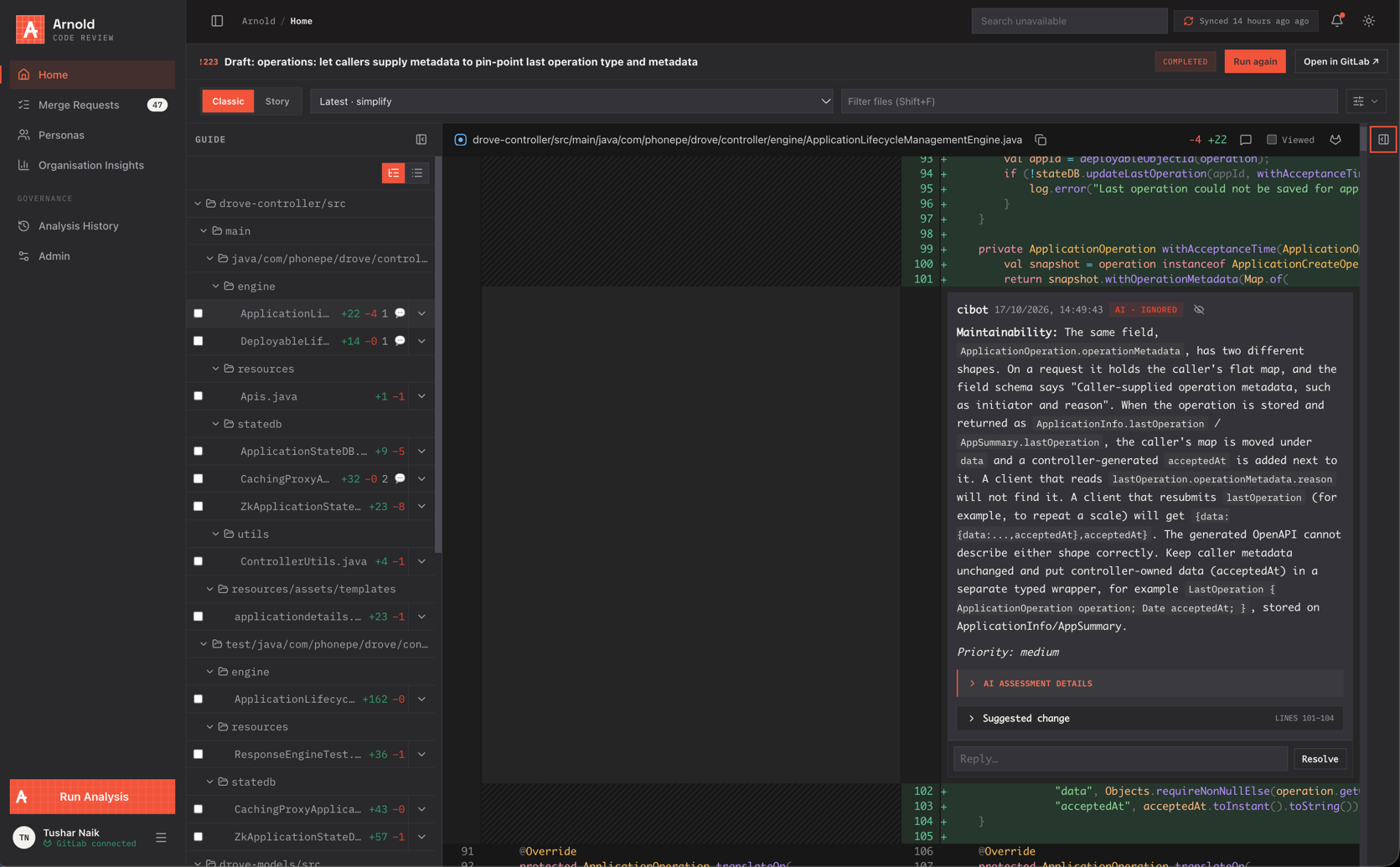
Layout
| Area | Contents |
|---|---|
| Header | Title, !number, repository, source → target branch, state, analysis status, Run again, link to the forge |
| Organisation tabs | Classic (file tree), Story (story mode), Persona (findings grouped by persona) |
| Toolbar | Diff version (latest or any earlier push), file filter (Shift+F), diff preferences |
| Guide (left) | File tree with Viewed checkboxes and comment counts, or story steps |
| Diff (centre) | Side-by-side or inline diff with threads |
| Insights (right) | verdict, build, details, activity tabs |
Both side panes can be resized or collapsed.
Diff preferences
- Show one file at a time
- Wrap lines
- Unresolved comments only
- Files with discussions only
- Hide all comments
- Side-by-side / inline
Insights
| Tab | Shows |
|---|---|
| verdict | Merge state, health (n/4 merge checks passing), mergeability, approvals, discussions, conflicts |
| build | Pipeline / checks status and link; analysis run progress (x/y personas complete) |
| details | Description, branches, labels, author, assignees, reviewers and their status, last sync |
| activity | Comments and history, filterable and sortable, with a comment composer |
Commenting and reviewing
- Click a line number to comment on a line; use the file header to comment on the whole file.
- Comment now posts immediately. Add to review saves a draft; drafts can be edited or discarded.
- Insert suggestion adds a suggested-change block.
- Reply to, Resolve and Unresolve threads. Outdated threads are collected in a collapsible section.
- The review bar publishes all drafts at once, with an optional summary, as Comment, Approve or Request changes.
- Add or remove reviewers from the details tab.
Everything is performed on the forge as you, through your connected account.
AI findings
Findings posted by an analysis run appear as normal threads, with extra context:
- Persona badge: Raised by the Netra review persona (v3) when a persona produced it.
- Priority: low / medium / high.
- Suggested change: the exact lines to replace, shown as a before/after diff. On GitLab, Apply suggestion commits it to the source branch. (On GitHub, use GitHub's Commit suggestion.)
- AI assessment: after the author pushes changes, Arnold assesses each finding:
| Badge | Meaning |
|---|---|
| AI · Applied | The change addresses the finding |
| AI · Partially applied | Partly addressed |
| AI · Ignored | Not addressed |
| AI · Not applicable | The finding no longer applies (code removed, false positive) |
| Stale | The assessment was made on an older commit than the current head |
Expand AI assessment details to see the reasoning and the assessed commit. These outcomes feed review metrics and persona acceptance rates.
Viewed files
Ticking Viewed on a file (or completing a story step) is saved per user and per head commit, so your progress survives reloads and resets when new commits arrive.